• Hi and welcome to the Studio One User Forum!

    Please note that this is an independent, user-driven forum and is not endorsed by, affiliated with, or maintained by PreSonus. Learn more in the Welcome thread!

M4 Mac Mini

Hello everyone,

this is my first post.
I have also ordered a Mac Mini M4 Pro (12C/24GB/512GB) for testing, as I want to upgrade from my Intel 12700k Win 11 system.
At the moment I have Mac OS Sequoia 15.2 installed.

After 3 weeks it looks like this.

Hardware:
- My UA Apollo 8 DUO and Twin DUO TB2 interfaces were recognized and working with the Startech TB3 -> TB2 adapter
- My USB devices could be made to work after a USB-hub marathon (Wes Audio, Cranborne Audio, SSL,TC,...)
- My 3 screens (LG,Dell,Philips) were connected to 2x TB5 port via adapter and Mac Mini HDMI-Out and are working at the moment
(had flickering on the Dell monitor and changed the color profile on all screens to “Display P3”, now it works)

Software:
- Studio One 7.0.2 installed and had issues with scanning VST2 plugins. After I had deleted the VST2 plugins
everything worked.
- Cubase 13 Pro installed and no problems so far (only during the first "UA connection config" Cubase crashed)

Comparison Studio One 7 vs Cubase 13:
Studio One is my favorite DAW. Unfortunately, I also have the most issues with it. Everything is still fine in the arrangement window.
When I open the mix-console and have a project with about 65 tracks, certain plug-ins are no longer updated all the time in the GUI
and graphics dropouts occur. This means, that if I take my "Flatline 2 Limiter" and open it "before" the mix-console, the whole system behaves very sluggishly, and there are graphic dropouts and the input with a mouse becomes sluggish. As soon as I close the mix-console, everything works fine (not as slick as Cubase).

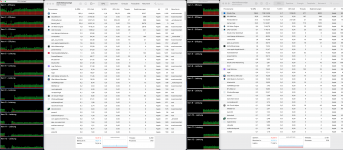
I recreated the same project in Cubase 13 to see what happens. Nothing, everything works as it should. I can open the mixer and also the arrangement window, the plug-ins react normally to mouse inputs or window movements. The CPU load on both DAWs is at approx. 30% (iStat). I have added the plugin list as a screenshot that I used in the project (Studio One and Cubase).

Temperature:
The Mac Mini M4 Pro gets very warm/hot if you load it with 30% CPU load for a longer period of time. The iStat display is at about 90 degrees Celsius. The fan slowly exceeds 1000 rpm (not really audible yet).

That's all I have at the moment.
There is a couple videos on YouTube that appears to show that Studio One 7 is not as efficient as Cubase (and several other DAWs) when run on the M4 Pro.


This may explain the results you are getting. Perhaps it will take some tweaking before Studio One 7 is ready for prime time on a M4 Pro based Mac.
 
This may explain the results you are getting. Perhaps it will take some tweaking before Studio One 7 is ready for prime time on a M4 Pro based Mac.
Don't know what that video guy did. Doesn't match my testing at all on the M4 Pro, which has been a total beast with S1 (see earlier in this thread). In my experience, it's more than ready for prime time. Extremely stable and wicked fast. For my projects, I've started running at 88.2/96K because, well, I can without any limitations.

Here's the thing - I can load it up to near overload with dropout protection set to medium (256 tracks/2500 plugins), and still record a new track at 32 samples without issue. That'll do fine.

That's the logic (Logic?) behind sticking to performance cores. To stay on the performance cores, S1 thread priorities are set high. Which, by the way, keeps other apps from getting priority over S1.

Other applications and utilities that you would run while running S1 (such as a browser) happily run on the efficiency cores. Before starting S1, I can see the other applications spread across all the cores (efficiency and performance). Once S1 gets going, the other applications get punted to the efficiency cores, and S1 has the performance cores all for itself. I believe that's why it's so stable near the limit.

Anyways, I know that there will be wide disagreement with this viewpoint. But I like being able to run mail, messages, browsers, etc., at the same time without worrying that I'll get spiking.

I've helped a few people with problems with S1 on the Mac Mini, and every time it's boiled down to a misbehaving plugin under Sequoia or a plugin using Rosetta.
 
Don't know what that video guy did. Doesn't match my testing at all on the M4 Pro, which has been a total beast with S1 (see earlier in this thread). In my experience, it's more than ready for prime time. Extremely stable and wicked fast. For my projects, I've started running at 88.2/96K because, well, I can without any limitations.

Here's the thing - I can load it up to near overload with dropout protection set to medium (256 tracks/2500 plugins), and still record a new track at 32 samples without issue. That'll do fine.

That's the logic (Logic?) behind sticking to performance cores. To stay on the performance cores, S1 thread priorities are set high. Which, by the way, keeps other apps from getting priority over S1.

Other applications and utilities that you would run while running S1 (such as a browser) happily run on the efficiency cores. Before starting S1, I can see the other applications spread across all the cores (efficiency and performance). Once S1 gets going, the other applications get punted to the efficiency cores, and S1 has the performance cores all for itself. I believe that's why it's so stable near the limit.

Anyways, I know that there will be wide disagreement with this viewpoint. But I like being able to run mail, messages, browsers, etc., at the same time without worrying that I'll get spiking.

I've helped a few people with problems with S1 on the Mac Mini, and every time it's boiled down to a misbehaving plugin under Sequoia or a plugin using Rosetta.

Thank you for your info. We have not experienced any issues with S7, the M4 Pro Mac Mini and Sequoia as well. However, our projects are only moderately demanding. The bottom line is that the M4 Pro processor is so powerful that only those who work on the most demanding projects would ever notice the difference in performance between DAWs, if there really is a difference.
 
The bottom line is that the M4 Pro processor is so powerful that only those who work on the most demanding projects would ever notice the difference in performance between DAWs, if there really is a difference.
Exactly! And this guy recently put this into perspective:

To view this content we will need your consent to set third party cookies.
For more detailed information, see our cookies page.

I sold my old MacBook (Intel i7 2019) because I had one last chance for an acceptable sale price. Some of my tracks were at about 70% CPU load. The same song files are now at just under 10% on the M4 Pro. And I haven't even heard the fans yet - I'll have to try them out soon to see if they work at all. ;)
 
Yeah. I picked up a Mac mini M2 Pro last year and was stunned by the difference between that and my Mac Pro. I have had absolutely zero problems with LARGE sessions. I am in disbelief by it every single day. It does everything *so* efficiently.
 
Here is a Mac Mini M4 Pro CPU/GPU comparison between Studio One 7 and Cubase 13. It seems that Cubase uses more GPU power..
 

Attachments

  • Studio One vs Cubase CPU_GPU.png
    Studio One vs Cubase CPU_GPU.png
    595,9 KB · Views: 33
The sluggish graphics behavior of various plugins only occurs when I activate the visibility of the "VCA fader" in the mix console. There is just one VCA fader in my song. If I don't have a VCA in the mix console everything works better. I don't have this behavior on my PC.
Is it just me?
 
At least for me, macOS 15.4 has solved some issues with my graphics.
 
I have had the Mac Mini M4 10 core for a few weeks now - I went for 32GB Ram and 2TB storage. The migration was pretty smooth, and everything seems to work - even older software like Arturia Mini Moog V. Had to do a lot of downloading to renew plugins, but it all seems okay atm.

I also bought the Minisopuru hub and installed a further 2TB storage - it is pretty seamless.

It was a toss up between the 10 core or the Pro but figured that more Ram and storage was a better option for me.
 
Last edited:
I have had the Mac Mini M4 10 core for a few weeks now - I went for 32GB Ram and 2TB storage. The migration was pretty smooth, and everything seems to work - even older software like Arturia Mini Moog V. Had to do a lot of downloading to renew plugins, but it all seems okay atm.

I also bought the Minisopru hub and installed a further 2TB storage - it is pretty seamless.

It was a toss up between the 10 core or the Pro but figured that more Ram and storage was a better option for me.
Have you tested your drive speed for the 2TB storage? I'm currently using an external Seagate SSD, which doesn't have spectacular performance, but seems to work well enough. But, I wouldn't mind upgrading if the speed improvement is significant.
 
Have you tested your drive speed for the 2TB storage? I'm currently using an external Seagate SSD, which doesn't have spectacular performance, but seems to work well enough. But, I wouldn't mind upgrading if the speed improvement is significant.
Do you mean the hub storage or the Apple internal storage?
 
Back
Top