• Hi and welcome to the Studio One User Forum!

    Please note that this is an independent, user-driven forum and is not endorsed by, affiliated with, or maintained by PreSonus. Learn more in the Welcome thread!

How to automate these?

coro

Active member
hey all!

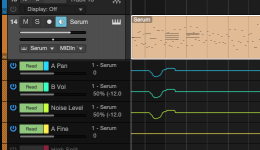
I'm pretty sure is possible but haven't found a way yet: how do you automate these knobs?

I'm a bit confused since as you can see it seems the automation has been recorded within the event but when I play back nothing moves.

Thanks for any hint!

1775045501621.png
 
Is the automation set to read? If you right click the knobs it shows edit automation and the lane will come up so you can tell if that lane is active or not.
 
Is the automation set to read? If you right click the knobs it shows edit automation and the lane will come up so you can tell if that lane is active or not.
that's what I can't set :)
I have a button on my StreamDeck to set the selected track in Latch whenever I want to automate inserts but in this case it doesn't do anything.

My guess is that because I'm not actually using a given knob in an insert plugin (it works all the time in this case) but this multiFX interface's knobs

To my knowledge S1 handles automation in 2 different ways:

- if it's an instrument is just embedded within the event

- if it's an insert you need to touch the parameter --> activate Latch --> S1 will automatically create an automation track --> set it back to Read once you're done

I'm not sure how to record the automation for these 8 knobs because my existing command for "set automation latch for selected track" doesn't work
 
I'm at a loss as far as the stream deck part but if you right click the serum track and choose expand automation, you should be able to see what mode the automation is in. Sorry if I'm misunderstanding!
 

Attachments

  • Screenshot 2026-04-01 at 9.34.46 AM.png
    Screenshot 2026-04-01 at 9.34.46 AM.png
    31,2 KB · Views: 6
oh no worries, thanks for chiming in anyway

stream deck is just a way to launch S1 shortcuts ;)
 
Back
Top