RedSkyRoad
Member
Imported from v7. My parameters are mapped to a macro button and the macro is automated.


My point is, it is very typical that when one company buys another, they start screwing with the original product that was working just fine and eventually it stops working to the satisfaction of many of the original loyal customers who end up with a product that they don't want!
I'm not sure if it's related but have you noticed FF ProQ4 is not detected in any shape or form parameter wise in the new track over veiw but ProQ3 is picked up. Just something I noticed. I wonder if ProQ3 would of reacted the same with the AA plugin in your case. There's definitely something off with certain plugin chains with regards to passing audio atm. It's above my pay grade but do you think it might be something to do with oversampling from one plugin to another in the same chain.*A little example...
Yesterday when I was working on a song, I had inserted in a track an Acustica plugin.
It was working just fine. Then to sculpt better the sound of that track, I inserted a Fabfiltel Pro-Q4 just before the Acustica plugin.
The Acustica plugin started to behave like bypassed. I move the Pro-Q4 after the Acustica and the sound behaviour became normal.
Is anyone else experiencing this issue in Studio Pro 8 while using Steinberg Spectralayers in ARA mode? It's absolutely awful — I can't work like this.

I’m having the same bug with NoiseWorks VoiceAssist, also via ARA.
The first time I add it to a clip, it sometimes works, but every time I try to open VoiceAssist again afterward to change any settings, the window just stays black.
Anyone else has problems with freezes with "Export Mixdown" after installing Fender Studio Pro 8?
On Windows: After exporting larger sessions, Studio Pro finishes the export and opens the target folder in Explorer, but then the GUI becomes completely unresponsive (export modal seems not released). App isn’t crashed (CPU/RAM still active, even autosaves), but UI thread is blocked and only Task Manager can close it.
Smaller exports often work. Happens across S1 6/7/Pro 8. Not plugin-specific.
Extra clue: While Studio One is stuck and Explorer is open, I cannot drag & drop the exported WAV into RX or other apps. The moment I kill Studio One, drag & drop works again → looks like a Shell/OLE deadlock after opening Explorer.
Only recent system changes: Fender Studio Pro install broke VEGAS Pro 21, so I had to reinstall/update VC++ redistributables. No recent Windows Updates.
Did anyone else see this or find a fix?

It's working just fine here. What kind of problem are you having and what version is it? As matter of fact all my ARA plugins are working as they should.Is anyone else experiencing this issue in Studio Pro 8 while using Steinberg Spectralayers in ARA mode? It's absolutely awful — I can't work like this.
By default, neither Studio One nor RX are running elevated on my system. I also tested running Studio One as administrator, but the issue still occurs.Quick check, are you running any of your apps as administrator, if so,.don't.
DynAssist and Melodyne also work fine for me. I only get the “black screen” with VoiceAssist. It works correctly in Pro Tools though.It's working just fine here. What kind of problem are you having and what version is it? As matter of fact all my ARA plugins are working as they should.

Try enabling High DPI ModeIs anyone else experiencing this issue in Studio Pro 8 while using Steinberg Spectralayers in ARA mode? It's absolutely awful — I can't work like this.

 studiooneforum.com
By default, neither Studio One nor RX are running elevated on my system. I also tested running Studio One as administrator, but the issue still occurs.
DynAssist and Melodyne also work fine for me. I only get the “black screen” with VoiceAssist. It works correctly in Pro Tools though.
I also see that you’re on macOS, which could affect the behavior.
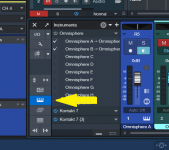
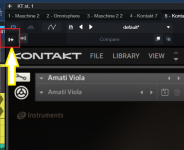
Is this what you are after?Does anyone know where the multi-out buttons for instruments have gone?
Oh dear, I'm afraid I cannot help you with that one.sintil8
This is the most stupid change.
I volunteered for the beta-testing phase of VoiceAssist. This was also a bug back then . Support responded that it´s a known problem and they would fix it, but I never received confirmation that the issue was fixed. Using the trial now and it still shows nothing.By default, neither Studio One nor RX are running elevated on my system. I also tested running Studio One as administrator, but the issue still occurs.
DynAssist and Melodyne also work fine for me. I only get the “black screen” with VoiceAssist. It works correctly in Pro Tools though.
I also see that you’re on macOS, which could affect the behavior.

It took me a bit to find it at first (frustrating!!) but it's still there, just moved to the upper left of the plugin window.sintil8
Yes, I already found it. It used to be in the plugin window, and it was convenient, but now you have to make a bunch of clicks, then find this VST instrument (and if there are a lot of them with the same name, the task becomes even more complicated).This is the most stupid change.

Попробуйте включить режим высокого разрешения (High DPI Mode).
Studio Pro 8 Melda Prod VST3 Plugins GUI not displayed correctly
View attachment 2907
Yup, can be frustrating, once you know where to look, it's easy enough to use.It took me a bit to find it at first (frustrating!!) but it's still there, just moved to the upper left of the plugin window.
View attachment 2913

This ^^^^no one can really tell a difference
We use essential cookies to make this site work, and optional cookies to enhance your experience.