• Hi and welcome to the Studio One User Forum!

    Please note that this is an independent, user-driven forum and is not endorsed by, affiliated with, or maintained by PreSonus. Learn more in the Welcome thread!

Color Toolbar 3.2.3 - Icon user file, editing & reloading not possible

Housemus

New member
Dear Fender friends,

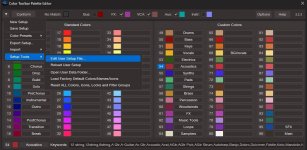
In 7.2.3. the color toolbar was functioning properly. In version 8.0 the icon matching is gone (see screenshot). The Color matching is still working. Do somebody know how to contact the developer of this great utility. The "conform" function is a great time-saver (it matches all of your tracks to keywords, that you have specified in a txt files for both colors and icons). A must have for Fender Studio Pro users!

I have read somewhere that the icon functionality has been changed/extended in version 8. Is there a workaround to get the icon matching working again?
 

Attachments

  • User Icon file & Reload User Icon file--- missing.jpg
    User Icon file & Reload User Icon file--- missing.jpg
    96,1 KB · Views: 44
Dear Fender friends,

In 7.2.3. the color toolbar was functioning properly. In version 8.0 the icon matching is gone (see screenshot). The Color matching is still working. Do somebody know how to contact the developer of this great utility. The "conform" function is a great time-saver (it matches all of your tracks to keywords, that you have specified in a txt files for both colors and icons). A must have for Fender Studio Pro users!

I have read somewhere that the icon functionality has been changed/extended in version 8. Is there a workaround to get the icon matching working again?
Hi, Studio One user Lawrence, or I think LFarr was the user who developed this great add on. I'm not sure if he's active on this forum. Ideally this is why a script such as this needs to be included by the developers and not a user in case there is a problem in a future version .
 
Hi, Studio One user Lawrence, or I think LFarr was the user who developed this great add on. I'm not sure if he's active on this forum. Ideally this is why a script such as this needs to be included by the developers and not a user in case there is a problem in a future version .
I agree, these kind of tools should be picked up by development. And made better/more simple to use. Like, the Fender way of doing. ๐Ÿ˜‰

If Lawrence is not working with FS8 anymore, maybe somebody else can edit the package and preserve the good work he has done ๐Ÿค˜

@Lukas Is it an idea that you continue working on this toolbar? Or speak to the devs to pick it up? Auto-coloring and Auto-icons based on keywords?
 
@Lukas Is it an idea that you continue working on this toolbar? Or speak to the devs to pick it up? Auto-coloring and auto-icons based on keywords?
Lawrence handed over development of the Color Toolbar to other Studio One users, but Iโ€™m not sure whether itโ€™s currently being actively developed.

I agree, these kinds of tools should be picked up by development and made better and easier to use. Like the Fender way of doing it. ๐Ÿ˜‰

This is never going to happen. They have their own plans, and integrating third-party scripts into the core application - and then maintaining and extending all those features - would be extremely time-consuming. I really donโ€™t see this happening.
 
Lawrence handed over development of the Color Toolbar to other Studio One users, but Iโ€™m not sure whether itโ€™s currently being actively developed.


This is most likely never going to happen. They have their own plans, and integrating third-party scripts into the core application - and then maintaining and extending all those features - would be extremely time-consuming. I really donโ€™t see this happening.
I know development and product management from first hand. It is fine that they have their own priority list for unique (new) features, copying nice features from competitors, refinements, bug fixes, GUI changes, refactoring etc...
Also a time/money/people question.

If they are not interested, maybe a paid extension like yours (Harmony Wizard/Scoring Tools) would be a middle ground for continuation.

But the question was: are you interested in maintaining this tool? Otherwise, do you possibly know the users that maintain this project? So I can reach out to them.
 
A new version of Color Toolbar supporting FSP8 has been made available. There is a notice on the download page that says Color Toolbar is at end-of-life.

I have asked for additional information, but haven't received anything yet.
 
I have tested it and its working great! As long as the codebase of FSP ain't gonna change (colors and icons), we can still use it.
 
This really needs to be incorporated into the main program by the developers. The code is written and no doubt could be made available for the presonus team to incorporate into the existing program. A win win for everyone.
 
The code is written and no doubt could be made available for the presonus team to incorporate into the existing program. A win win for everyone.
But this is not how things work.


A new version of Color Toolbar supporting FSP8 has been made available
๐Ÿ‘
 
Well, devs can be stubborn to admit that somebody else has made a good extension and want to invent the wheel for themselves. But, if they were willing to cooperate they can still be blocked by product management, because this tool is moving in the opposite direction. They want to simplify the software and are focussing on starters. Nerdy tools for power users are not of their interest. Its all about politics where the software is gonna go from here.

My take is to always listen to your existing customers and especially your power users. They know the possibilities and gaps to refine and complete the software. As simple as possible (less clicks, less clutter) is always good, but not simpler. Finish the launcher, the show page and patterns for example and keep the focus on workflow. That was your USP.
 
Well, devs can be stubborn to admit that somebody else has made a good extension and want to invent the wheel for themselves. But, if they were willing to cooperate they can still be blocked by product management, because this tool is moving in the opposite direction. They want to simplify the software and are focussing on starters. Nerdy tools for power users are not of their interest. Its all about politics where the software is gonna go from here.

My take is to always listen to your existing customers and especially your power users. They know the possibilities and gaps to refine and complete the software. As simple as possible (less clicks, less clutter) is always good, but not simpler. Finish the launcher, the show page and patterns for example and keep the focus on workflow. That was your USP.
Not that simple. Assuming dev/QA resources are more/less fully utilized, additional resources would be req'd to maintain/QA/test. I'm not sure this toolbar would increase revenue enough to offset the cost. There is also the possibility that similar functionality is on the roadmap for the (perhaps distant) future.
 
Hi Jeff good to see you on this board. Will you be updating your excellent Studio One Signal Flow diagram?
+1
This would be good, if at all possible.

Always a useful ref. document

Kindest regards
 
Last edited:
Not that simple. Assuming dev/QA resources are more/less fully utilized, additional resources would be req'd to maintain/QA/test. I'm not sure this toolbar would increase revenue enough to offset the cost. There is also the possibility that similar functionality is on the roadmap for the (perhaps distant) future.


I disagree. It is that simple and it is politics. I spoke about costs, time and people before. Fender is going for starters and are focussing on simplifying.
Anyway, I will use this great addition until it is not working anymore, before Fender Suno Pro 9 has been dropped ๐Ÿ˜‰
 
Last edited:
The icon function is greyed out so is not working - I don't use that so had not noticed - but the main functions still work well. Let's hope it can be continued as it is very helpful.
 
Back
Top