• Hi and welcome to the Studio One User Forum!

    Please note that this is an independent, user-driven forum and is not endorsed by, affiliated with, or maintained by PreSonus. Learn more in the Welcome thread!

Can anyone help interpret this crash dmp file?

SIXSGMA

New member
Hi everyone, I've been having persistant issues with this crash for years since (atleast V6).
Starting a family has meant I've been spending less time on music and this persistant issue has turned me off of music even more.

To the best of my knowledge, this crash happens when I am doing either of the following:

Deleting multiple audio tracks (like ~10+),
Dragging in audio files from browser (~10+),
Timestretching audio

It doesn't happen every time I do the actions, but I'd say atleast 20% of the time.

This leads me to suspect its something to do with caching. (I've also tried toggled the cache setting)

I've even done a clean install of Windows/studio One and problem still persists.

My system specs are Windows 11, Ryzen 3900x, 64GB RAM, RTX2060, OS is on NVME SSD, Project folder and samples are on SATA SSDs. Interface is Presonus Studio 192

I'm also considering transferring my project folder to an NVME drive if some how read/write speeds are to blame.

Hopefully this is not too against the forum rules, but I changed the file extension from .dmp to .txt to bypass the attachment restrictions.

Any help would be greatly appreciated.
 

Attachments

Hi, welcome to the forum!

While we try to help as much as we can here, PreSonus Support is definitely the best place for analyzing crash dumps.
I took a look at the file using WinDbg, but I'm not very familiar with this tool - unlike Tech Support and the Studio One QA team, who analyze crash dumps all day.

WinDbg suggested that an exception occurred in the JavaScript engine, and the last command listed in the file is Audio | Detect Tempo.
So it might be related to tempo detection - but no guarantee, as I really don't usually use this tool.

Are there audio files that reliably reproduce this crash?

Lukas
 
Thanks Lukas. I submitted a ticket.

It happens with stem files that have tempo information.

I just created a new song (on my NVME), added a dozen stems. Played with tempo, deleted half the stems, promptly added a bunch of other stems, and crash.
When the crash happens, the cache activity meter is >50%.

I checked Windbg and same error and last action as before.

It's almost like the crash happens because two functions are trying to access the cache at the same time.
 
Hi, welcome to the forum!

While we try to help as much as we can here, PreSonus Support is definitely the best place for analyzing crash dumps.
I took a look at the file using WinDbg, but I'm not very familiar with this tool - unlike Tech Support and the Studio One QA team, who analyze crash dumps all day.

WinDbg suggested that an exception occurred in the JavaScript engine, and the last command listed in the file is Audio | Detect Tempo.
So it might be related to tempo detection - but no guarantee, as I really don't usually use this tool.

Are there audio files that reliably reproduce this crash?

Lukas

After several days of troubleshooting with support and on my own. I found the culprit!

I was curious why the Editor would open when I deleted a track.
Then looking through WinDBG I found a macro being run.

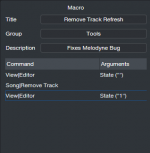
I had replaced my keyboard shortcut for "remove track" to "Remove track Refresh" this macro would toggle the editor, remove the track and reopen the editor. I believe I had set this up as a workaround to a bug with Melodyne ARA in S1 V4 or V5.

I'd still call this a bug, but to be fair to the devs its probably unexpected user behaviour. :)
 
That's interesting.

But does that mean, the crash does only happen when you run this macro (with your defined shortcut)?
I tried triggering it from the macro toolbar and same thing happend. I think the macro is triggering actions too quickly compared to the realtime state so some variable is not where it is expected to be yet.

Here's a screen recording I made of the crash.

Notice first couple times I run the macro, the editor says "no track selected", but then after a couple times the editor is just blank and thats when the crash happens.

I'd report this in the Beta but I think I they shut it down for this cycle or I may have gotten kicked out for being inactive the last couple rounds. Mostly because this bug (of my own making) had turned me off from music :(

Here's a screen shot of the macro as well. I think very OG S1 users will vaguely remember the Melodyne bug that this resolved.
 

Attachments

  • Screenshot 2025-11-13 091554.png
    Screenshot 2025-11-13 091554.png
    10,1 KB · Views: 10
Back
Top