• Hi and welcome to the Studio One User Forum!

    Please note that this is an independent, user-driven forum and is not endorsed by, affiliated with, or maintained by PreSonus. Learn more in the Welcome thread!

Bluetooth midi single or double button device!

Scardo

New member
Hi All, having trouble finding relevant info on this.

I am unable to connect my various Bluetooth pedals to Studio One V6.5. That aside, what I'm really trying to achieve though is a simple button bluetooth or wireless controller that I can attach to my guitar to use for next / previous patch etc. I play a kick-drum with my left foot so firing the FBV MKII with my right foot can often be a real challenge- balance and timing wise.

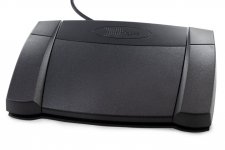
I'm thinking of something like this:

If anyone can point me in the direction of a suitable user group or specialist midi device experts, that'd be great!
Thanks
Scardo
 

Attachments

  • 516kBIooRSL._AC_SL1500_.jpg
    516kBIooRSL._AC_SL1500_.jpg
    56 KB · Views: 2
I have used a USB foot switch since about 2004 for controlling playback of my backing tracks.

https://piengineering.com/collections/footswitches
And you'll see they also sell gizmos like you we after.

It has 3 programmable foot switches. Built like a tank. A bit pricy but 10 years after I bought it a mirco switch died and they sent me 3 new switches for free! You had to always run the Macroworks software. That died with W 11. But I can still use it on my W10 laptop. Anyways I get it, you don't want a footswitch. But this thing has lasted me 2 decades! Bulletproof!

I needed a 4THswitch to go back one song, to solve that I bought a Stealth switch 3 which has 5 ports and you can use any un latching footswitch in other words any push button! You could actually build it in to your guitar. It stores the macros internally which is why I mention this. But it's not wireless. Actually I would say if you can hardwire something //do it! Bluetooth is super funky.

I also tried a couple of those Amazon $30 switches and every one of them died in no time. And they all came with supper sketchy software that was written for Windows XP or?? So that's the problem with these cheapo devices. Make sure you can send it back. It will be the dependability factor which is pretty critical doing gigs.
The Stealth is used by hundreds of gigging musicians because it's bulletproof. I see the software is from 2017 but I just installed it on W11 and it works fine still. SUpper easy to use.
 

Attachments

  • footpedal-unit_1_1.jpg
    footpedal-unit_1_1.jpg
    36,5 KB · Views: 3
  • ss3-quick-start-4-300x251.png
    ss3-quick-start-4-300x251.png
    104,2 KB · Views: 3
  • Screenshot (1024).png
    Screenshot (1024).png
    356,3 KB · Views: 2
Last edited:
Thanks for this, but I already have a bullet-proof Line 6 FBV MKII that works - I'm trying to have a wireless guitar mounted solution, as I said, so none of your suggestions are of any use, as they are all wired.

Also the fact that Studio One appears to not support Bluetooth in any way is annoying. I've just written to support to ask about it. The Show Page absolutely should have the equivalent of a Page Turn facility to select Next and Previous etc, as virtually all live Score reading and similar stage apps do.
 
So what you need is a wireless keyboard. But only part of it.
I still don’t think Bluetooth is dependable enough.
Mixcraft has a Network connection to your mobile device that controls playback, recording and volume. It’s very simple and works. So it is possible for Daw developers to integrate remote controls over the network.
This is the same concept as how most digital mixers are controlled on mobile devices.

Possibly you should look into which Daw’s have the live performance features that you need. It is definitely a topic that comes up and it seems like not a lot of options are available.
That is why I always used simple wave files. Midi would have been nice to have but everything I tried was way to slow between songs and I couldn’t jump around the set.
 
So what you need is a wireless keyboard. But only part of it.
I still don’t think Bluetooth is dependable enough.
Mixcraft has a Network connection to your mobile device that controls playback, recording and volume. It’s very simple and works. So it is possible for Daw developers to integrate remote controls over the network.
This is the same concept as how most digital mixers are controlled on mobile devices.

Possibly you should look into which Daw’s have the live performance features that you need. It is definitely a topic that comes up and it seems like not a lot of options are available.
That is why I always used simple wave files. Midi would have been nice to have but everything I tried was way to slow between songs and I couldn’t jump around the set.
I think Bluetooth for simply selecting next or previous item in the setlist or song arrangement should be fine - I can still have my FBV pedal as a backup. As to the DAW, as I said, I'm already using Studio One's Show Page, and it works very well indeed.

I do not use wav files, no click track, S1 is simply a virtual Effects rack receiving audio from the UAD Apollo and sending it back (just the FX not the original signal, which goes straight through the UAD Console, so no latency.) into a stereo pair of FX Virtual channels on the UAD Console.
I can run the DMX lights within S1 via Showbuddy Active (as an"instrument" created in S1 and addressed by patch / bank changes). Patch changes also from S1 for different song settings for the UAD Console.

So in fact it's such a small ask of S1 - just the ability to be freed from the FBV foot-pedal to switch songs and sections. I remember starting my show programming in Cubase, using the arrangements sections, but opting for S1 as it really is perfectly setup for live performance (Show Page), but I cannot remember whether Cubase can see a Bluetooth pedal. I may check it if it doesn't pan out with S1, but there are a couple of options I've discovered since posting that may give me a simple button device (FLIC DUO) which can talk to the CME-Pro WIDI dongle. If I get these devices and they work I'll no doubt post a video on my Youtube. There's a lot one can do for live shows using a MacBook (so your Mixcraft suggestion, Windows only) controlling lights and effects and video. I'm surprised there aren't more devices popping up as more and more lower level (non-stadium) shows need multi-media of various sorts.

The thing about the Show Page of S1 / F Studio Pro, is that the way it's laid out and the patch selection for each input is so intuitive and easy to manage. Whereas for example the Steinberg offer, VSTLive 2, is simply over-designed and not at all intuitive, nor is it stable yet.

I hope Fender continue to develop the Show Page, it's good to see video added, I haven't upgraded yet as 6.5 is working just fine and I don't need video at the moment. Most of the other offerings for this kind of software (MainStage, Cantabile, etc) all seemed to be geared towards keyboard players with masses of VST Instruments, not live inputs such as microphones, guitars etc. Basically I'm turning a multi-channel interface into a very highly specced digital mixer. I've yet to hear an affordable digital mixer with the quality of reverbs such as Valhalla, Eventide, Relab 480 etc, all available in my MacBook.
 
hope Fender continue to develop the Show Page, it's good to see video added,
That would have been something I would’ve appreciated. I used to be able to remember all of the lyrics for like 200 or more songs but as I got older I realized I was slowly forgetting them. So I simply dumped my backing tracks into Vegas and added lyrics as 4 lines at a time. Not quite Karaoke because you need to know the timing.
But it gave me more confidence to play request songs that I hadn’t played for a long time.
Win Amp played Movies no problem.
 
Back
Top