• Hi and welcome to the Studio One User Forum!

    Please note that this is an independent, user-driven forum and is not endorsed by, affiliated with, or maintained by PreSonus. Learn more in the Welcome thread!

Solved About the VU Meter

a true channel strip that resides on channels with controls all visible, unlike the Fat Channel.

Well, this isn't what you're asking for 🤔 but it's an interesting workaround. All the parameters for the Waves G-series SSL channel strip fit in a channel's micro-edit view. Yeah, that's a very tall channel fader! However, there are four mitigating factors that make this more useful than it might seem at first:

  • Once you choose a third-party plug-in's parameters for the micro-edit view, it persists any time you insert that processor in the mixer.
  • You can hover the mouse over a fader and adjust it with the scroll wheel.
  • With a shorter mixer channel, there's a vertical scroll bar so you can still go to the parameters that you want.
  • You can also open the Channel Editor. It too shows the expanded parameter list. Although you can't see all the parameters at once, you can still use the vertical scroll bar. However, the faders are longer so they're easier to adjust, and the parameter names don't need to be abbreviated in most cases.

Like I said...it's not what you want, but I use this technique for several plug-ins, especially if they take up a HUGE amount of screen space and I usually adjust only a limited number of strategic parameters.

1762892610470.png
 
  • Like
Reactions: AAV
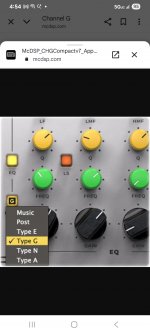
I will try using your suggestion. I do have the Waves SSL-G, and for that matter, try a few other plugs using the panel. Believe it or not, being able to cursor over controls, scroll to adjust without having to click first was something I always liked about Studio One. So, I'll explore the micro view in such ways going further. It could prove to be a time saver and making mix adjustments fast (initally) are so important. Fact is Craig, you're giving me another idea. I have a McDSP G channel Strip V7 and the downside was always that I couldn't view readings (see attached) because there are no silk-sceen like, or numerical settings to go by. Horrible. The fix is to use the micro view. A little embarrassing, I'm thinking of this now.
Much appreciated.
 

Attachments

  • Screenshot_20251111_165422_Chrome.jpg
    Screenshot_20251111_165422_Chrome.jpg
    151,9 KB · Views: 12
FWIW the TBProAudio mvMeter2 is really good, and it's free. However, it doesn't open a thumbnail in a mixer channel if you expand it. To me, that's the standout feature of the PreSonus VU Meter.
Thanks Craig, very good recommendation. I have done a very accurate ballistics test and this meter is also very good that way as well. Its very close to the real thing. Its better and closer than the Klanghelm meter also. Very close the Waves VU's except you don't have to pay for it.. But all the meters mentioned so far will do an excellent job of showing the important thing such as rms levels etc.. Ballistics are a more subtle thing and can tell you more once you learn to read them.
 
Last edited:
  • Like
Reactions: AAV
So I setup the Micro Edits for the McDSP Ch G V7. I placed the most used (EQ) at the top for real estate, and comp/lim, below. TY Craig. I think I'm going to set out and start making some pseudo ch. strips. Just for those speedy occasions.
 
I was also looking for the free VU Meter.

What is the official process to get it added to my account, should I just open a support ticket?
 
TY Craig. I think I'm going to set out and start making some pseudo ch. strips. Just for those speedy occasions.

Cool, I do think the micro-edit view is an underrated feature. When used as detailed above, it may remind Sonar users of the Pro Channel without the graphics ;)
 
Cool, I do think the micro-edit view is an underrated feature. When used as detailed above, it may remind Sonar users of the Pro Channel without the graphics ;)
Yes. I've glanced at Sonar through the years and I know what you mean. Good example. I always respected Sonar from a distance, although I never purchased or needed it. MIDI edits and the User Interface were really well designed. My heart goes out to those folks left out in the cold.

As for the Micro Edit view, silly me for not ever adopting it. I saw that feature from its initial release, only I was so geared into habits, that I plumb forgot to give the micro panel a chance. One of my first moves on any ch. Strip or on any console I'd ever owned is reaching for a LPF or HPF. even adopting that with a few instant controls should pose very useful. Thanks for the common sense tip. This will become a staple going forward.

Some quick tips I found are:
1. When first selecting multiple controls off a plugin to add to the strip, use Control to grab all of the parameters for that channel at one time. Bam, done. Then, slide controls to desired position.
2. When adjusting the ch. strip, select Shift + scroll, for fine adjustments. Kind of standard stuff, but one might forget and it really adds to speed and accuracy, respectively.

Its all achieved, very quickly.
 
I was also looking for the free VU Meter.

What is the official process to get it added to my account, should I just open a support ticket?
IIRC... I'm pretty sure that it's only available for those on a current Presonus + (subscription) plan.
 
IIRC... I'm pretty sure that it's only available for those on a current Presonus + (subscription) plan.
Issue has been solved (post marked "Solved"). The OP now has it back.
Thanks, though.
 
Some quick tips I found are:

One last tip: The kind of tip I showed is exclusive to 3rd party plug-ins. The PreSonus plug-ins have fixed parameters for the micro-edit view.
 
I was also looking for the free VU Meter.

What is the official process to get it added to my account, should I just open a support ticket?
To be honest, I don't know if it will work. I am a version 6 user and obtained it at that time, but now the Presonus website no longer allows the plugin to be obtained separately. Maybe you can try to apply for one?

But I should point out that the biggest advantage of the Presonus VU meter is its perfect integration with Studio One, but in terms of functionality and aesthetics, it’s not as good as third-party plugins like mvMeter.
 
Well, this isn't what you're asking for 🤔 but it's an interesting workaround. All the parameters for the Waves G-series SSL channel strip fit in a channel's micro-edit view. Yeah, that's a very tall channel fader! However, there are four mitigating factors that make this more useful than it might seem at first:

  • Once you choose a third-party plug-in's parameters for the micro-edit view, it persists any time you insert that processor in the mixer.
  • You can hover the mouse over a fader and adjust it with the scroll wheel.
  • With a shorter mixer channel, there's a vertical scroll bar so you can still go to the parameters that you want.
  • You can also open the Channel Editor. It too shows the expanded parameter list. Although you can't see all the parameters at once, you can still use the vertical scroll bar. However, the faders are longer so they're easier to adjust, and the parameter names don't need to be abbreviated in most cases.

Like I said...it's not what you want, but I use this technique for several plug-ins, especially if they take up a HUGE amount of screen space and I usually adjust only a limited number of strategic parameters.
I once set similar micro-editing parameters for some of my channel strips. After a while, I felt they didn't really meet my expectations, so I deleted them.

To be honest, the idea behind this feature is good, but it needs improvement in functionality. For example, there’s no way to disable the feature with a single click, some buttons can only be controlled with sliders, and the mouse wheel can easily accidentally adjust sliders when scrolling through plugins and the mixer.
 
That, and a true channel strip that resides on channels with controls all visible, unlike the Fat Channel. Full functioning metering, and full functioning channel control.

Over here that's called Scheps Omni Channel - complete with it's very own keyboard shortcut :)

And it is very easy to add any micro-edit parameters to the channel strip - but even that is no gift for old eyes. I just open the UI and tweak as needed.

VP
 
Since SO7, all previously paid add-ons (such as Batch Converter) are now part of the application, regardless of the license type.

I don't understand why this free VU Meter isn't part of the Studio One's stock Plug-In set by default.
 
Over here that's called Scheps Omni Channel - complete with it's very own keyboard shortcut :)

And it is very easy to add any micro-edit parameters to the channel strip - but even that is no gift for old eyes. I just open the UI and tweak as needed.

VP
Here too! I've been a big fan of the SOC since its release. I also agree, opening and having the visuals from the UI are just going to be super easy. Craig's workaround can serve useful for some key parameters one mostly will use. I think my happy place on Craig's example will be setting just a few key settings, and only a few, such as:
•HPF (vari)
•LPF (vari)
•Compression (on/off)
•Limiter (on/off)
and perhaps a few settings making for a quick adjustment possible. Obviously any real EQ, compressor threshold/attack/release settings are right from the GUI.

I think once there are more than 6 or 7 items placed on the micro edit panel, things get a bit convoluted or that they simply look too much the same to react instantly too. Opened GUI plugs just work. Or even better, off a control surface.

Like the Omni Channel, the plugin Alliance Amek 9099 has way too many important features that require serious viewing and information
Still, the forum feedback is all appreciated! 👍
 
Maybe something like SSL 360 or Reason? That might also be good; sometimes changing the approach can bring a lot of different inspiration.
I know where you're coming from. Reason's, being very basic though, but still emulates an SSL-9000. It's that channel strip familiarity that I think people relatively new, but want to up their game with channel EQ, compression, limiting, gate and filtering control will benefit. Once people grow out of having 47+ compressors, 14+ reverbs, and 29+ compressors, and learn how to actually develop with 4 of each, they won't ever know what sculpting a mix is all about. I mean that sincerely.

And if it means anything, as I'm always growing and developing myself as well. I was using the Fat Channel today on a bass and acoustic guitar track. I flirted with a few of the supplied Fat Channel compressors, filtering, and limiter, and was getting some wonderful trade-offs that I might not have ever experienced even with my other go to 3rd party plugs. Things like at sections where I muffed notes in places, they sounded so much more pronounced. So the Fat Channel offerings are nearly there! I just think Presonus development need to better bundle their channel strip visually. I'm sure that means facilitating their Studio Live SE mixers as well, but hey..... why not if firmware allows for it, and on the software side of Studio One as well. In short, make the GUI, more full on, visual at a glance i.e. channel strip like. Don't just call it one. Today, I enjoyed the Fat channel sonically, and that's my own revelation.
 
Last edited:
Back
Top