• Hi and welcome to the Studio One User Forum!

    Please note that this is an independent, user-driven forum and is not endorsed by, affiliated with, or maintained by PreSonus. Learn more in the Welcome thread!

Trumpet stem- need to make midi

perplexiated

New member
Windows 11 studio one pro 7.2.3...
I need to take a poorly recorded trumpet track and convert it to midi then change it to clarinet. The harshness of the trumpet makes correction difficult for me (new user). I can get my track changed properly to melody but I can't take the next step to export as a midi file. I'm using the limited Melodyne that comes with studio. Though not related to this question, my interface is focusrite 2i2 4th.
Thanks!
 
I can get my track changed properly to melody but I can't take the next step to export as a midi file.
What do you mean by the above? If you have an instrument track, with your extracted midi (via melodyne?), you can click on the event, go to Event in the main menu, and find "Export Selection", then choose Midi File from the drop down menu.
 
To get MIDI from an audio track in Studio One using Melodyne, right-click the audio event and select "Edit with Melodyne," then drag the notes from the Melodyne editor onto a new instrument track. Alternatively, use the Ctrl+M (Windows) or Cmd+M (Mac) shortcut to open Melodyne on the selected audio track. After Melodyne analyzes the audio, close the editor, and Studio One will automatically create MIDI notes on a new track.
 
What do you mean by the above? If you have an instrument track, with your extracted midi (via melodyne?), you can click on the event, go to Event in the main menu, and find "Export Selection", then choose Midi File from the drop down menu.
I should have been more clear but "but I can't take the next step to export as a midi file" and I can't convert to midi.
 
To get MIDI from an audio track in Studio One using Melodyne, right-click the audio event and select "Edit with Melodyne," then drag the notes from the Melodyne editor onto a new instrument track. Alternatively, use the Ctrl+M (Windows) or Cmd+M (Mac) shortcut to open Melodyne on the selected audio track. After Melodyne analyzes the audio, close the editor, and Studio One will automatically create MIDI notes on a new track.
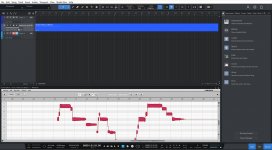
I'll try that but the Trumpet stem was interpreted by Melodyne (within Studio) as something odd. It was a somewhat straight line blob with variations. I did go to audio (I think) and change it to melody and it looked normal. I don't know how to tell if that stepped blob notation is midi as is and I can't find convert or export as midi.
You wrote "drag the notes from the Melodyne editor onto a new instrument track" I guess that suggests that my now melody file is already in midi form?
 
A "Melodyned" event will show those "white stripes" in the event
Bildschirmfoto 2025-11-23 um 16.48.02.png


You can drag such an event to an empty instrument track--> a midi part is created:
Bildschirmfoto 2025-11-23 um 16.49.40.png


Right click this part, under "event" look for "export selection"
This let´s you export your trumpet as a MIDI-file (see the ending .mid)
this MIDI-file can be imported to any other DAW
Bildschirmfoto 2025-11-23 um 16.50.16.png
 
I have not found a way to drag or copy paste the file below in the pic up to Studios track. As you can see, it's not in midi format. I want to start over since the recording is too difficult for me to fix. The trumpet track is red because it's selected.
 

Attachments

  • Trumpet.jpg
    Trumpet.jpg
    111,6 KB · Views: 13
Back
Top